Posts

Showing posts with the label windows

Kill Windows Processes That Won't Die with "Ultimate Process Killer"

Image
When trying to kill a process in Windows, you probably head for one of the following: The Processes tab in Windows Task Manager's, where you try killing the process (tree) Or Sysinternals Process Explorer , which may succeed where Task Manager failed.  However, if Sysinternals Process Explorer can't kill a process, you'd be forgiven for thinking that there is no hope and for wondering why Windows is still so darn stupid ;) However, this evening I succeeded in killing a very stubborn process using a utility named after a future Arnold Schwarzenegger movie: Ultimate Process Killer . It's free on Sourceforge and I was able to use it to successfully kill a process in Windows 7 that refused to be killed by the options mentioned above. I even tried suspending and unsuspending the process in Process Explorer, which I saw suggested somewhere, but that also didn't work for me. By the way, I have no idea how well it will work on other versions of Windows, but I r...
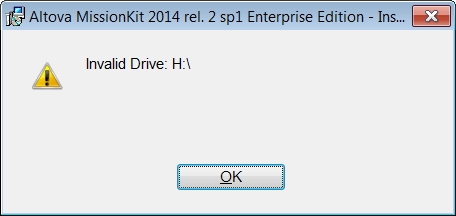
Fix Windows Installer "Invalid Drive" error

Image
Problem You may get an error like this when trying to install something on Windows (Windows 7 in my case). You may assume it is caused by an inaccessible network drive (e.g. H in my case) and that disconnecting the drive will solve the problem. It didn't for me. Rebooting also didn't solve the problem. Then I found this Microsoft article , which was rubbish. Then finally I found this Microsoft Technet article and the top answer over there solved my problem. Solution The Technet article recommends checking the following 2 registry locations: HKEY_CURRENT_USER\Software\Microsoft\Windows\CurrentVersion\Explorer\User Shell Folders and HKEY_LOCAL_MACHINE\SOFTWARE\Microsoft\Windows\CurrentVersion\Explorer\User Shell Folders In the first location I found this. Note how there is one reference to drive H, the rest are to a system var %USERPROFILE%. Simply modifying the path H:\Favorites to %USERPROFILE%\Favorites solved the problem immediately. The ins...

Run Custom Windows 7 Search via Shortcut

We often put documents into folders in Windows and then forget where they were. But that's what's great about searching. In Windows 7 you just type a search string in the top-right corner of an Explorer Window and it's pretty good at finding your files. If you often search for the same type of file across a broad folder structure, you may find this tip useful as it will show you how to create a Windows shortcut that immediately performs a custom search. It basically just launches a Windows search page and starts running your pre-configured search query straight away! The sources below helped me to create my first direct Windows shortcut as follows: To make a shortcut in Windows, just right click inside a Windows Explorer window or on the Desktop and choose New > Shortcut. Insert the following string as the shortcut path then click Next: %SystemRoot%\explorer.exe "search-ms:query=hello&crumb=kind:pics&" Give your shortcut a name and click ok Th...

Windows XP is dead, but not Vista or Windows 7!

As the local friendly tech support guy (for family friends and neighbours) I am slightly amused, or rather NOT so amused by the fact that I have been approached by people that have 'heard' that we all have to upgrade to Windows 8 because Microsoft will no longer support their existing systems very soon. Now seeing as I have been approached about this by completely different people, I can only conclude that Microsoft either on purpose or accidentally is pushing this bullshit through various channels to trick people into throwing out their existing PCs in favour of the brand new Windows 8. This sort of thing pisses me off no end, as so many folks are pretty clueless when it comes to this sort of thing and at the same time so dependent on their trusty home computers. So I'm just putting this post out to reproduce the true data from Microsoft themselves regarding when people need to change their existing home computer setup and when they DON'T need to do anything at a...

How To Fix Windows Offline File Sync Error

When trying to sync offline files in Windows you may sometimes get an error “parameter is incorrect”. Before I show you how to fix it, I'll tell you what's most probably gone wrong. This quote is a post I found in the digitalspy forum (see my sources) and explains it beautifully. "The simplest explanation is that you've exceeded the maximum path and/or file lengths. On Windows-based platforms, paths must be less than 248 characters, and file names must be less than 260 characters. 'Path' includes all the nested folder names, eg "C:\MyPrograms\Microsoft Office". 'File Names' include the extension ." Now here's a great way to identify which path or file is causing the problem. Get the Path Scan app from here  http://www.softpedia.com/get/System/File-Management/Path-Scan.shtml  (This is an older version of Path Scanner but you need it because it works with UNC paths - i.e. paths that start with double-slash '\\' - wherea...