Posts

Showing posts with the label iphone

AppInfo Lists Tweaks by Install Date

Image
The AppInfo iPhone tweak is unmissable on a jailbroken iPhone, giving you access to all sorts of information: A list of your apps from the Apple AppStore A list of Cydia tweaks and repositories Springboard tweaks iPod music Most of which can be exported as a simple or detailed list that you can email (to yourself). Extra noteworthy is that the lists of AppStore apps and Cydia tweaks can be sorted: Alphabetically Size Date Installed Install Date helps you remember which apps or tweaks you installed most recently. Can be very useful, for example to help you identify sudden problems you may experience with newly installed apps or tweaks, like sudden increased battery drain, poor performance, or crashes. This Cydia tweak can be found in the BigBoss repository, usually shipped by default in Cydia.

Send iPhone photos to PC Instantly

Image
This is a pretty random post, but it may just stick at the back of your head and save you a minute or two. How do you get a photo or pic (e.g. a screen capture) from your iPhone to your laptop/desktop PC very quickly? I usually email it. But today I couldn't be bothered to wait that long. First, the Gmail progress bar always annoys me, then I can't copy paste the image straight out of Gmail. Alternative? Facebook. Share the image directly from your iPhone's camera roll or photo stream to Facebook - make it PRIVATE if you want by selecting "Only Me" under Audience. Then navigate to facebook.com, hit your profile and right-click to copy the photo/pic. This took me a matter of seconds. Simple, trivial, but very satisfying!

Fix your iPhone Facebook app login problems!

If you are getting an error every time you try to login to the Facebook app on your iPhone, try this solution. Go to http://www.facebook.com/iphone On the left-hand side (you may need to scroll down) click "Remove app" Now try logging in again on your iPhone. Source I found the solution here: http://goo.gl/LPYEu So what caused the problem?.. Not exactly sure, but this started happening right after I update my Facebook security setting. I had turned on HTTPS and had activated alerts for when a new computer or mobile device logged in to my account. One of these settings must have caused it.

Lost your iPhone status bar?

Has your iPhone status bar vanished? Or does it seem to vanish when you close an app? Have you been fiddling about with Winterboard? Chances are you’ve got the Winterboard “SolidStatusBar” option switched on. This was driving me crazy but I finally discovered it. Not at the top of my Winterboard configurations list of course so I didn’t notice it was on at first. Eventually I scrolled right down to the bottom and there it was with an annoying little tick next to it ;-) keywords:  status bar top screen iphone vanished disappeared time date winterboard gone disappears

Recover data from a restored iPhone (part 2)

Image
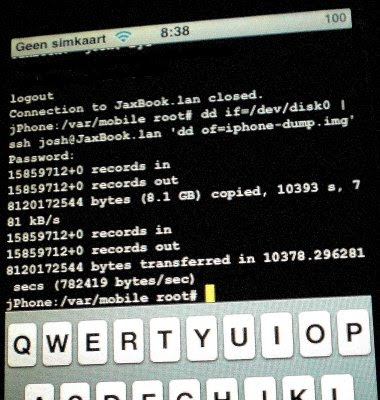
PLEASE NOTE : this method will almost certainly NOT work with an iPhone 4 or above, and may NOT work with the 3GS (although I have heard some report that it did work for them with a 3GS). The reason for it not working is to do with hardware encryption. Now on with the guide... This guide is the practical implementation of the "how to" guide that I posted a while back. That original "guide" only consisted of 3 links. The first link was to a modmyi.com tutorial, and the other two were to pages with Cygwin information. When I finally got around to executing the plan, I only needed the first link. Because since the original post I've bought a Macbook, and therefore don't need to use Cygwin (which for those that don't know provides you with a Unix environment inside Windows). So armed with the modmyi.com guide I set out on my little iPhone image dump adventure. I'm just going to repeat parts of the guide or reference it, adding little extras spec...

How to get an SSH server running on a Mac

To SSH into your Mac you just need to do the following. Go to System preferences >> Sharing Check the "Remote Login" box That's it! This will start sshd on your system and you can now be able to SSH your Mac with your usual Mac username and password. If this helped you out, hit the +1 button below. If not, feel free to leave a rude comment ;-)

Recover data on a restored iPhone

I haven't yet attempted to or succeeded in recovering any data from the previous increment of my 2G iPhone, so this is more of a note-to-self. After screwing it up with a new version of Installer (don't touch Installer with a long barge pole people, stick to good old Cydia.. and u know what they say about curiosity and what it did to the cat, well I was the proverbial cat) I restored it in iTunes. My shopping list for trying to dump the iPhone disk image to my PC in URLs is: A tutorial from the people that know: http://www.modmyi.com/forums/file-mods/237321-how-iphone-data-recovery.html#post1484071 A guide to setting up an SSH server on Cygwin http://lifehacker.com/software/home-server/geek-to-live--set-up-a-personal-home-ssh-server-205090.php And er, a newbie's guide to Cygwin http://lifehacker.com/software/cygwin/geek-to-live--introduction-to-cygwin-part-i-179514.php Wish me luck!

iPhone upgrade: 1.1.4 (ZiPhone) to 2.1 (Custom ipsw) [via 2.0.2 QuickPwn]

I followed a bunch of stuff I read on the Code Retard blog and found my way from a 1.1.4 iPhone (unlocked and jailbroken with ZiPhone) to a 2.1 iPhone (curtesy of Pwnage) Now I'm going to be short and sweet. - First I installed iTunes 8. Now that was kinda unintentional, but heh, what can you do! - I hooked my 1.1.4 iPhone (ZiPhoned) up to iTunes 8. (You can skip the red bits if you want because I finally resorted to custom firmware) - I did Shift+Restore (hold down Shift and press Restore button) and loaded up an original 2.0.2 firmware image. - After the 2.0.2 firmware was in place (took a while) iTunes was moaning about the SIM card being no good blah blah blah. Don't worry, that's what QuickPwn is for. - I then ran QuickPwn 2.1 GUI and voila my phone was unlocked. - iTunes was happy again - Then I tried to upgrade to firmware from 2.0.2 to 2.1 in iTunes. Something that the Code Retard blog had said was possible (I thought). Anyway, it didn't work for me and I don...