Posts

Kill Windows Processes That Won't Die with "Ultimate Process Killer"

Image
When trying to kill a process in Windows, you probably head for one of the following: The Processes tab in Windows Task Manager's, where you try killing the process (tree) Or Sysinternals Process Explorer , which may succeed where Task Manager failed.  However, if Sysinternals Process Explorer can't kill a process, you'd be forgiven for thinking that there is no hope and for wondering why Windows is still so darn stupid ;) However, this evening I succeeded in killing a very stubborn process using a utility named after a future Arnold Schwarzenegger movie: Ultimate Process Killer . It's free on Sourceforge and I was able to use it to successfully kill a process in Windows 7 that refused to be killed by the options mentioned above. I even tried suspending and unsuspending the process in Process Explorer, which I saw suggested somewhere, but that also didn't work for me. By the way, I have no idea how well it will work on other versions of Windows, but I r...

AppInfo Lists Tweaks by Install Date

Image
The AppInfo iPhone tweak is unmissable on a jailbroken iPhone, giving you access to all sorts of information: A list of your apps from the Apple AppStore A list of Cydia tweaks and repositories Springboard tweaks iPod music Most of which can be exported as a simple or detailed list that you can email (to yourself). Extra noteworthy is that the lists of AppStore apps and Cydia tweaks can be sorted: Alphabetically Size Date Installed Install Date helps you remember which apps or tweaks you installed most recently. Can be very useful, for example to help you identify sudden problems you may experience with newly installed apps or tweaks, like sudden increased battery drain, poor performance, or crashes. This Cydia tweak can be found in the BigBoss repository, usually shipped by default in Cydia.

Send iPhone photos to PC Instantly

Image
This is a pretty random post, but it may just stick at the back of your head and save you a minute or two. How do you get a photo or pic (e.g. a screen capture) from your iPhone to your laptop/desktop PC very quickly? I usually email it. But today I couldn't be bothered to wait that long. First, the Gmail progress bar always annoys me, then I can't copy paste the image straight out of Gmail. Alternative? Facebook. Share the image directly from your iPhone's camera roll or photo stream to Facebook - make it PRIVATE if you want by selecting "Only Me" under Audience. Then navigate to facebook.com, hit your profile and right-click to copy the photo/pic. This took me a matter of seconds. Simple, trivial, but very satisfying!

Free Summer Vacation Music Tip

Image
If you need a nice juicy supply of new tunes for your Summer vacation, you can use a 1 month free Spotify Premium subscription - easy to cancel before you actually get charged. Spotify Premium will let you download as much music as you like legally, for free, on your phone/tablet/laptop. You can cancel before the month is up and you will not be charged! Even if you've done it before, you can do it again, just sign up for Spotify using a different email address. So here are the steps (and some Tips!) Sign up for Spotify (NOT with Facebook but with an email you don't use much)  https://www.spotify.com/signup Then log on to your new Spotify account and opt for 1 month free Spotify Premium. Use PayPal to pay for it (other payment method also probably ok) Download Spotify on your phone/laptop/tablet, https://www.spotify.com/download  then open Spotify, browse the app and put all the music you like into PLAYLISTS. It's important to make playlists as this allows you t...

Fix Windows Installer "Invalid Drive" error

Image
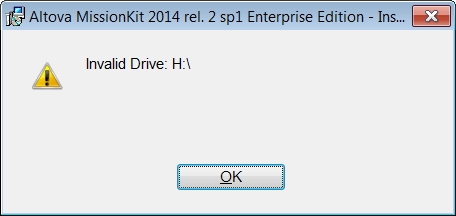
Problem You may get an error like this when trying to install something on Windows (Windows 7 in my case). You may assume it is caused by an inaccessible network drive (e.g. H in my case) and that disconnecting the drive will solve the problem. It didn't for me. Rebooting also didn't solve the problem. Then I found this Microsoft article , which was rubbish. Then finally I found this Microsoft Technet article and the top answer over there solved my problem. Solution The Technet article recommends checking the following 2 registry locations: HKEY_CURRENT_USER\Software\Microsoft\Windows\CurrentVersion\Explorer\User Shell Folders and HKEY_LOCAL_MACHINE\SOFTWARE\Microsoft\Windows\CurrentVersion\Explorer\User Shell Folders In the first location I found this. Note how there is one reference to drive H, the rest are to a system var %USERPROFILE%. Simply modifying the path H:\Favorites to %USERPROFILE%\Favorites solved the problem immediately. The ins...