Posts

Bookmarklet to selectively print areas of web page

This bookmarklet when clicked will let you select (multiple) custom sections of the current web page with shortcut combo Alt+left-mouse-click, then press Enter to Print just those sections. It'll show you which sections can be selected by highlighting the border of a section blue, as you hover with the mouse. The border turns red if you Alt+click it. A little HUD menu pops up top right to show the keyboard shortcut keys. There are two ways you can save this bookmarklet to use yourself. Either drag this link -> Selective-Print-bookmarklet  <- to your bookmarks toolbar. Or make a normal browser bookmark of this web page (can be any page because you're going to change the link, but this page will do). Then edit the bookmark and replace the entire link with the javascript string in the text box below. It's this javascript that does the bookmarklet magic: Copy javascript from here with the Copy button, or triple click, then Ctrl+C  Copy ...
TokenHome liquid real estate

Introduction This post is inspired by  this article  I read on 7th June 2021. Since no details were provided I decided to design my own implementation. TokenHome is a fictitious platform that  makes real estate more liquid, not only giving those with less disposable income access to the benefits of real estate investment, but also providing home owners with a flexible way to safely borrow against their home without fear of losing their home (as with legacy mortgages). I’ll update the post if any new caveats, insights, etc come to mind, so watch this space. This is how it works.  The actors involved “homeowner” who wants to safely borrow against their home “tokenholder” who wants to invest in the property market in a tokenised way (will become clear below) “TokenHome” the ficticious organisation that matches homeowner and tokenholder and acts as an intermediary. [I've since discovered that 1 or more real entities exist that use the name "TokenHome". This post has noth...

Get Facebook Notifications on Chrome Desktop

Just visit the mobile Facebook site http://m.facebook.com in the Google Chrome desktop browser and you will be prompted to allow notifications. If you accept, Chrome will enable Facebook notifications, which will appear in the bottom right corner of your PC. Sick of seeing them? Just follow these steps to switch notifications in Chrome off:  https://support.google.com/chrome/answer/3220216?hl=en .

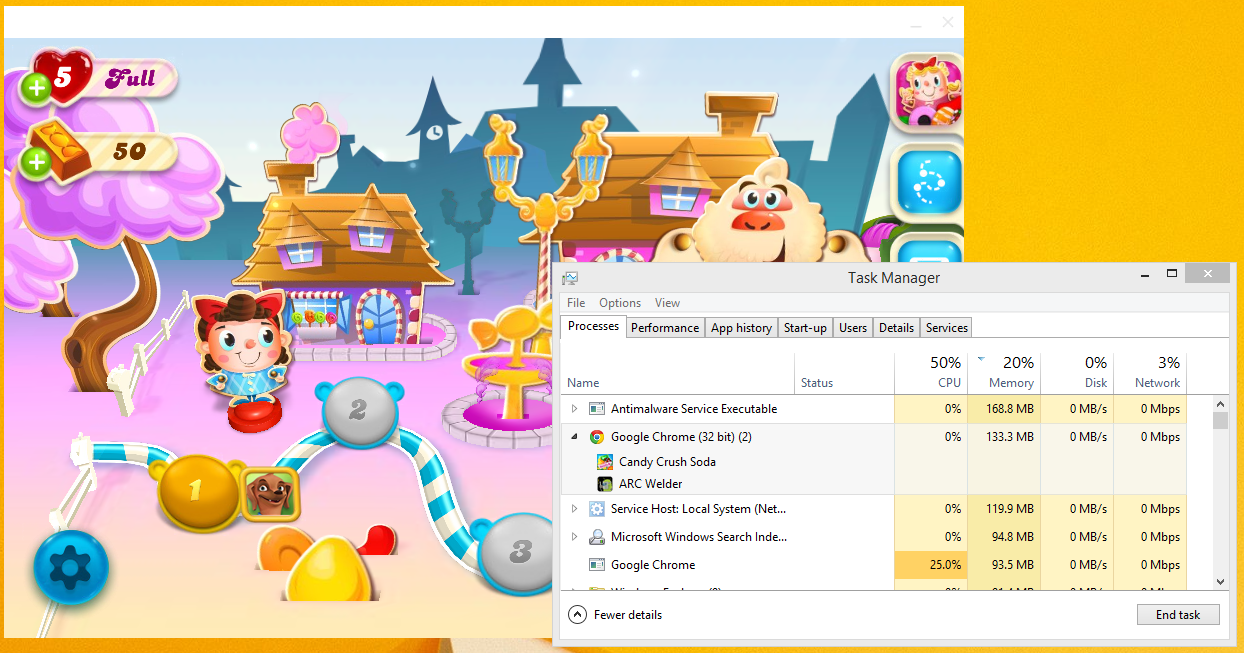
Run Android Apps in Google Chrome Browser (yes really!)

Image
This guide will show you how to run Android apps in Chrome. You can run Play Store and non-Play Store apps. You just need the APK file for the app. I'll show you how to download the APK file for Google Play Store apps. For non-play Store apps you'll need to figure out how to get the APK yourself. Then you can run Android apps like Candy Crush (not sure if that will be convince or deter you!) on your desktop just using the Google Chrome browser! Follow these steps. Install the ARC Welder  app in Google Chrome. (This is a proper Google developer app ) In Chrome, click the "Apps" button in the Bookmarks bar.  This button is on the bookmarks toolbar, so you might need to go to Chrome settings, then "Bookmarks" > "Show bookmarks bar" to display it. Or go to the local apps page directly:  chrome://apps/ . Run the ARC Welder app with the following icon. Click the round orange plus button and select your Android app's APK file (for non...

Kill Windows Processes That Won't Die with "Ultimate Process Killer"

Image
When trying to kill a process in Windows, you probably head for one of the following: The Processes tab in Windows Task Manager's, where you try killing the process (tree) Or Sysinternals Process Explorer , which may succeed where Task Manager failed.  However, if Sysinternals Process Explorer can't kill a process, you'd be forgiven for thinking that there is no hope and for wondering why Windows is still so darn stupid ;) However, this evening I succeeded in killing a very stubborn process using a utility named after a future Arnold Schwarzenegger movie: Ultimate Process Killer . It's free on Sourceforge and I was able to use it to successfully kill a process in Windows 7 that refused to be killed by the options mentioned above. I even tried suspending and unsuspending the process in Process Explorer, which I saw suggested somewhere, but that also didn't work for me. By the way, I have no idea how well it will work on other versions of Windows, but I r...

AppInfo Lists Tweaks by Install Date

Image
The AppInfo iPhone tweak is unmissable on a jailbroken iPhone, giving you access to all sorts of information: A list of your apps from the Apple AppStore A list of Cydia tweaks and repositories Springboard tweaks iPod music Most of which can be exported as a simple or detailed list that you can email (to yourself). Extra noteworthy is that the lists of AppStore apps and Cydia tweaks can be sorted: Alphabetically Size Date Installed Install Date helps you remember which apps or tweaks you installed most recently. Can be very useful, for example to help you identify sudden problems you may experience with newly installed apps or tweaks, like sudden increased battery drain, poor performance, or crashes. This Cydia tweak can be found in the BigBoss repository, usually shipped by default in Cydia.

Send iPhone photos to PC Instantly

Image
This is a pretty random post, but it may just stick at the back of your head and save you a minute or two. How do you get a photo or pic (e.g. a screen capture) from your iPhone to your laptop/desktop PC very quickly? I usually email it. But today I couldn't be bothered to wait that long. First, the Gmail progress bar always annoys me, then I can't copy paste the image straight out of Gmail. Alternative? Facebook. Share the image directly from your iPhone's camera roll or photo stream to Facebook - make it PRIVATE if you want by selecting "Only Me" under Audience. Then navigate to facebook.com, hit your profile and right-click to copy the photo/pic. This took me a matter of seconds. Simple, trivial, but very satisfying!

Free Summer Vacation Music Tip

Image
If you need a nice juicy supply of new tunes for your Summer vacation, you can use a 1 month free Spotify Premium subscription - easy to cancel before you actually get charged. Spotify Premium will let you download as much music as you like legally, for free, on your phone/tablet/laptop. You can cancel before the month is up and you will not be charged! Even if you've done it before, you can do it again, just sign up for Spotify using a different email address. So here are the steps (and some Tips!) Sign up for Spotify (NOT with Facebook but with an email you don't use much)  https://www.spotify.com/signup Then log on to your new Spotify account and opt for 1 month free Spotify Premium. Use PayPal to pay for it (other payment method also probably ok) Download Spotify on your phone/laptop/tablet, https://www.spotify.com/download  then open Spotify, browse the app and put all the music you like into PLAYLISTS. It's important to make playlists as this allows you t...

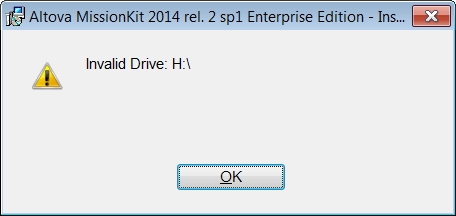
Fix Windows Installer "Invalid Drive" error

Image
Problem You may get an error like this when trying to install something on Windows (Windows 7 in my case). You may assume it is caused by an inaccessible network drive (e.g. H in my case) and that disconnecting the drive will solve the problem. It didn't for me. Rebooting also didn't solve the problem. Then I found this Microsoft article , which was rubbish. Then finally I found this Microsoft Technet article and the top answer over there solved my problem. Solution The Technet article recommends checking the following 2 registry locations: HKEY_CURRENT_USER\Software\Microsoft\Windows\CurrentVersion\Explorer\User Shell Folders and HKEY_LOCAL_MACHINE\SOFTWARE\Microsoft\Windows\CurrentVersion\Explorer\User Shell Folders In the first location I found this. Note how there is one reference to drive H, the rest are to a system var %USERPROFILE%. Simply modifying the path H:\Favorites to %USERPROFILE%\Favorites solved the problem immediately. The ins...

Don't be fooled about Net Neutrality

The provocative title is so that I can air a grievance that I have about the way internet providers (cable companies and mobile operators) are presenting the Net Neutrality discussion that is flooding the interwebz right now. Basically articles about Net Neutrality are way too long and are often misleading. I will try to continue in that line ;-) At least the way-too-long is almost unavoidable. Misleading I try not to be. I must admit I am still fully comprehending it myself, but the term Net Neutrality should speak for itself. To me it means what it says, but to add a couple more words to make it nice and clear. "Net Neutrality is about having a neutral internet." However, the EU likes to define it as: "the principle according to which all internet traffic is treated equally, without discrimination, restriction or interference, independently of its sender, recipient, type, content, device, service or application." ( citation ) Right, well at least my defin...

Run Custom Windows 7 Search via Shortcut

We often put documents into folders in Windows and then forget where they were. But that's what's great about searching. In Windows 7 you just type a search string in the top-right corner of an Explorer Window and it's pretty good at finding your files. If you often search for the same type of file across a broad folder structure, you may find this tip useful as it will show you how to create a Windows shortcut that immediately performs a custom search. It basically just launches a Windows search page and starts running your pre-configured search query straight away! The sources below helped me to create my first direct Windows shortcut as follows: To make a shortcut in Windows, just right click inside a Windows Explorer window or on the Desktop and choose New > Shortcut. Insert the following string as the shortcut path then click Next: %SystemRoot%\explorer.exe "search-ms:query=hello&crumb=kind:pics&" Give your shortcut a name and click ok Th...

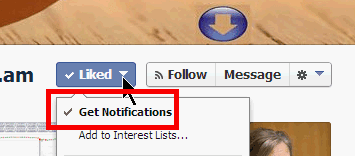
Fix Too Many Notifications from a Facebook Page

Image
Are you getting a whole load of notifications from a Facebook page that you have liked? To stop getting notifications do the following: 1) go back to the Facebook page that is sending you all the notifications 2) click the "Liked" button 3) from the drop-down menu simply remove the tick from "Get Notifications" by clicking it (See picture above.) You should now stop getting notifications from the page.

Fix Google Authenticator Codes Not Working

Image
If your Google Authenticator app codes are not working, you might want to check the time on your phone is set correctly!  This was really bugging me and eventually it dawned on me that this was the problem. Notably some codes worked and some didn't. Now all codes work fine.

Windows XP is dead, but not Vista or Windows 7!

As the local friendly tech support guy (for family friends and neighbours) I am slightly amused, or rather NOT so amused by the fact that I have been approached by people that have 'heard' that we all have to upgrade to Windows 8 because Microsoft will no longer support their existing systems very soon. Now seeing as I have been approached about this by completely different people, I can only conclude that Microsoft either on purpose or accidentally is pushing this bullshit through various channels to trick people into throwing out their existing PCs in favour of the brand new Windows 8. This sort of thing pisses me off no end, as so many folks are pretty clueless when it comes to this sort of thing and at the same time so dependent on their trusty home computers. So I'm just putting this post out to reproduce the true data from Microsoft themselves regarding when people need to change their existing home computer setup and when they DON'T need to do anything at a...

FB LNKD GOOG

After babbling about smart watches I couldn't hold back on this one either. There are 3 interesting tech stock. Sure, a lot of people are interested in them. These are stock to buy and keep on buying for the next 5 to 10 years. These are fundamental companies of the interwebz today and for the coming decade. Sure there are others, but I like these guys. Facebook isn't going any-bloody-where despite what pundits waffle about te death of social. It's next financial results will show nothing less than a boom that will no doubt eclipse its last astonishing set of stats. Next to Google, it is set to gobble up a whole lot of tasty advertising budget. Google is just doing things right. From the buzz around Google Glass to the plodding ascent of Android. They are by far the smartest company on the planet. LinkedIn is Facebook for serious work peoples. Let's face it. And there the revenue for job ads can only go in one direction. I mean, Monster-who? That was fun.

iWatch and iSee

This post is simply intended to vent my feelings about the smart watch. I'd like to first throw out the prediction that the smart watch will be a big device and make tech companies plenty of money. It's hard to say how long it will last, but I'm guessing like.. forever :) You see, a watch is just something on your wrist. But let's face it, a smart watch is not a fucking watch is it. It's a personal computing device, just like your phone is today. In fact I really hope that Apple does not call it a watch or even use the word watch in their keynote. And I really believe that the smart watch (I'm allowed to call it that) has the potential to save Apple from a bit of a long term downturn (it'll take a while for iphone fever to lessen, but the 5c doesn't really cut it in my opinion). Apple need to make their wrist-worn iDevice as damn hot as the first iphone.  Everyone knew it was a smartphone and yet it blew everyone - and the entire smartphone (if...

Cancel Your Spotify Premium Trial Instantly

Clicking the link below will direct you to the Spotify website and cancel your Spotify Premium trial immediately . I repeat, it will cancel immediately, so if you are logged in and you click the link, that means you just cancelled. https://www.spotify.com/account/subscription/cancel/ If you're not looking to cancel and just want some information about Spotify, here are some useful links. To just view your Spotify account info go here. https://www.spotify.com/account/subscription/ There's also the customer services contact form. https://www.spotify.com/about-us/contact/contact-spotify-support/ I don't know how long these links will stay valid and if they will work in all countries in all circumstances (e.g. for Facebook and non-Facebook connected accounts) please let me know if they don't work for you and say what country you are in. Source:  http://community.spotify.com/t5/Help-Accounts-and-Subscriptions/Can-t-delete-Premium-Account/td-p/209556

WhatsApp from your Phone & Computer at the same time (PC/Mac)

Image
** UPDATE March 2015 ** WhatsApp now has a web interface, which you can use on all mobile devices except for iPhone. So if you have an Android device or Windows Phone, check out web.whatsapp.com  first as it may save you a lot of hassle! If you're on an iPhone however, please read on.. ** UPDATE March 2015 ** I implemented a nice way of using WhatsApp on my laptop and also staying in sync with WhatsApp on my iPhone. This will work with Android too (but you may prefer to use  web.whatsapp.com  instead). List of things you need: You must have a second SIM card (i.e. a second working mobile phone) that is not already being used for WhatsApp.  E.g. an old prepaid phone. As long as it has a working SIM card and you are able to receive an SMS message on it. A free program for your computer called BlueStacks, which you can get for PC or Mac at  http://www.bluestacks.com . ** UPDATE March 2015 ** Alternatives to BlueStacks are: AndY (free!) ; AMIDuOS ($10)...

Emoji That Work on Facebook iPhone App

Image
I decided to post all the emoji from the iphone emoji keyboard on my Facebook status to see which ones would be displayed in the iphone App. Even though you can type in any iphone emoji you want when updating your status and can even actually post your status with any iphone emoji in it without getting an error, many of the emoji don't actually display in the iphone app when you refresh it to see what you posted. The image in this post shows all the emoji that I was able to see in the Facebook iphone app after submitting my status. NOTE: Unfortunately, what emoji you can see depends on what you are viewing Facebook with. Below is what you can see in the iphone App, but when I checked it with the Google Chrome desktop browser, very few emoji were displayed :-(

Sign up for Dropbox here to give me more space

If you are not yet signed up for Dropbox, but plan to sign up for it soon. Please sign up for it via this special referral link: http://db.tt/CFJPmGeP . If you follow the link, then sign up immediately, Dropbox will give me some extra storage space as a reward for referring you and I'd really appreciate that! For those who don't know what Dropbox is, it's a really user-friendly online storage service. Highly recommended!